---
title: "EOY (End of Year) Submission Guide"
slug: "eoy-end-of-year-submission-guide"
updated: 2026-01-14T18:22:09Z
published: 2026-01-14T18:22:09Z
canonical: "help.schoolwise.com/eoy-end-of-year-submission-guide"
---
> ## Documentation Index
> Fetch the complete documentation index at: https://help.schoolwise.com/llms.txt
> Use this file to discover all available pages before exploring further.
# EOY (End of Year) Submission Guide
## **The #1 Question - Yes, ROLLOVER MUST be completed BEFORE certifying EOY!**
**SchoolWise ROLLOVER MUST be done BEFORE certifying your EOY files!**
Please review and complete all 6 steps in the Rollover Review - Best Practices Guide before moving on.
**Are you required to submit EOY 1 data?**
Read below to find out:
- Elementary districts with grades K–6 **DO NOT** report EOY 1.
- Elementary districts with departmentalized courses in grades 7–8 and high school districts must submit data for EOY 1.
**Pre-EOY HINTS & TIPS**
- Please **Do Not** begin EOY file submissions before the school year is over. You should be done entering attendance, discipline records, program enrollment, and exits (students/staff) for the year.
- If you’ve already begun to send up files for EOY don’t worry. The E155 file does need to be sent before you can certify, so sending the file after is ok. However, if you started to submit files BEFORE your last day of school you MUST start over at the beginning.
- Keep in mind that you should be logged into **the current school year** when running your files.
- **POST** means '**Save'** to CALPADS**.** No information will save to CALPADS unless it's POSTED!
| **EOY 1** Course Completion for Grades 7–12 CTE Participants, Concentrators, Completers Work-Based Learning Indicators | **EOY 2** Program Eligibility/Participation |
| --- | --- |
| **EOY 3** Student Incidents (all suspendable incidents) Cumulative Enrollment Student Absence Summary One-Year Graduate and Completer Counts Total count of RFEPs during the school year Homeless Students (Program Code 191) | **EOY 4** Special Education Postsecondary Outcomes for Students with Disabilities (SWD) Prior Year Completers (Can only be submitted by SEIS or SIRAS) Please coordinate with SPED admin |
**Documentation - Overview and Training for CALPADS EOY**
CALPADS End-of-Year Submissions [https://csis.fcmat.org/resources-repository#CALPADSResources](https://csis.fcmat.org/resources-repository#CALPADSResources)
## **CALPADS EOY File Submission Overview**
Just like in Fall 2, CALPADS assumes that you have all of your (Fall 1) files up to date prior to submitting any files for EOY. For example - if student data has changed since the last time you submitted the; SENR, SINF, SPRG or SELA exports, you should run those and get up to date BEFORE submitting for EOY.
Send files up one at a time, work on error correction and once the file is clean, make sure the status says **POSTED - BEFORE** sending up the next file. Files often rely on each other in order to go up without errors. Also, **DO NOT** try and FIX **CERTIFICATION ERRORS** until ALL OF YOUR FILES have been submitted to CALPADS (and posted- in order) and you have waited overnight for the new snapshot to be generated.
**RUN ALL INFO-CHECK FORMS FIRST**
1. Before exporting your student data and sending it to CALPADS, **check your information** by running the following reports:
- Student Information Check Form
- Student Program Check Form
- Student Suspension Absent Check Form
- Student Suspension Special Ed Check Form
2. Then make sure to **verify your numbers** by using these reports:
- Student Absenteeism Count w/Student Totals
- Student Count In All EOY Programs This Year
- Suspension Action Taken Counts
- Suspension Summary 1 Line Per Student
- Student Absenteeism Count ISAC
- Student Absenteeism Count w/Student Totals ISAC
The CDE *(State)* requests that LEAs *(Your School)* submit files for EOY in the **SPECIFIC ORDER BELOW!**
1. Step ONE - CALPADS End of Year 2
*Specific Program Participation Only*
- (E155) - CALPADS SSID Enrollment (Use the CBEDS date for this year)
- (Updates) - CALPADS Student Information (If any updates since the last reporting period)
- SPRG Student Program
**2. Step TWO - CALPADS End of Year 4**
*Special Education (Submitted using SEIS, SIRAS, or other SPED SIS) Please contact your SPED coordinator to facilitate file submissions to CALPADS.*
**3. Step THREE - CALPADS End of Year 3**
*Student Discipline: Suspensions & Expulsions & Student Absent Summary*
- SINC Student Discipline, SIRS Student Incident Result & SOFF Student Offense
- STAS Student Absence Summary
**4. Step FOUR- CALPADS End of Year 1**
*Course completion for grades 7-12 and Career Technical Education*
- SDEM Staff Demographics
- CRSC Course Section Completion
- SCSC Student Course Section Completion
- SCTE Student Technical Education
##
**Please Review these TIPS for ALL CALPADS submissions**
The data that CALPADS is collecting is becoming MORE and MORE relied upon for **FUNDING and TESTING**. Before sending up any file to CALPADS **ALWAYS** make sure to:
1. REVIEW - ALL INFO CHECK forms. (eg. Student Information Check Form, Student Program Check Form, Staff Info Check Form, Course Info Check Form…)
2. Review EOY specific reports to verify that the data you have in SchoolWise is correct. (List Students in ALL EOY Programs This YEAR, Student Count in All EOY Programs, Students with CTE Pathway Codes, Student Absenteeism reports…)
3. Just because there are NO ERRORS it does not mean you are submitting accurate data!
4. **Make sure your numbers and counts make sense BEFORE submitting files to CALPADS.**
In SchoolWise you will find all the **End of Year** Extract reports under a folder called: **File Exports – CALPADS End of Year,** in the Report Explorer. Each Report is a container that has links for each file that is required by the submission.
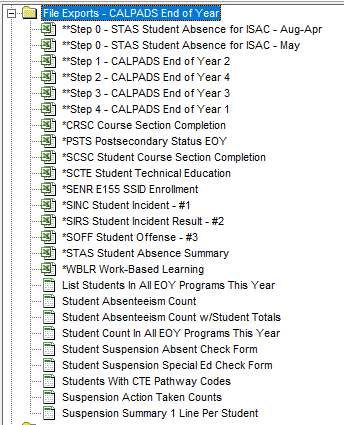
*Keep in mind - It’s possible that some of the EOY submissions may not even apply to your school, you may only need to certify your data if nothing new has changed (since your last submission) or some of the submissions may not apply to your school at all.*
## **EOY File Submission TIPS**
- **Even if there is no data to send, you still have to certify each submission in CALPADS.**
- If nothing has changed and/or you have just sent up **SSID Enrollment** & **Student Information** files for other extracts, you do not need to re-send them again with each EOY submission. When sending up (*Updates) files, use the date of your last submission. It will pull data from then to today. You do have to send up **E155 at least once**, even if you have been doing updates. Keep in mind that **ROLLOVER has to be done BEFORE you send up the E155 file!**
EOY 2 – Specific Program Participation
The following files need to be exported for 'End of Year 2':
- **SENR E155 - SSID Enrollment**
- **Updates 1 SINF Student Information**
- **SPRG Student Program (EOY2)**
This submission includes the following student Program information:
- Armed Forces family member (192)
- Opportunity Program (108)
- California Partnership Academy (113)
- California School-Age Families Education (Cal-SAFE) (162)
- NCLB Title I Part A Basic Targeted (122)
- NCLB Title I Part A Neglected (174)
- 504 Accommodation Plan (101)
- Transitional Kindergarten (185)
- Homeless (191) (Replaces the old residential status.)
*****HIGH SCHOOLS ONLY** – There are two new checkbox fields for Grade 9 and above. These show up on the Student Profile page directly below the student photo on the left. Please check each student that this applies to. The data will go up in all student SINF submissions.
- Golden State Merit Diploma
- Seal of Bi-literacy

**Participating Program Checklist** *(This is done automatically at rollover)*
If students are participating in Title I Targeted, Title I Part A Neglected, Transitional Kindergarten or the 504 Accommodation Plan, the program record should be **closed each year** and re-submitted again the next year with a **new start date** if the student continues in the program. This is true even the student is expected to continue participation in the program the next year.
**SchoolWise Reports for EOY2:**
1. **Student Program Info Check Form** ('File Exports – CALPADS' category) Run this with the Data Collection parameter set to 'End of Year 2'. If there are a lot of pages of data to correct, please give us a call. We have put together a tool to assist in cleaning up this data for you.
2. **List Students in All EOY Programs this Year** and **Student Count in All EOY Programs This Year** ('File Exports - CALPADS End of Year' category) These reports will show what CALPADS should be counting for your Participating Program enrollment counts.
3. **List Students in All Programs (Date Range)** ('Programs, Activities, & Forms' category). This report when run in the current school year will show you all students that you have marked as still in these programs. While CALPADS used to count students that were in the program and have not left, they now require end dates. If this report is significantly larger than the ones in step 2 above, SchoolWise can assist with a bulk tool to help.
EOY 3 - Discipline: Suspensions and Expulsions & Student Absent Summary
Keep in mind that **EOY 4 has to be done BEFORE you send up EOY 3!**
The Following Files need to be Exported for 'End of Year 3':
- **SINC Student Incident** (Data has to be entered into the Discipline Tab on the Student Form under Suspensions/Referrals) currently CALPADS only requires the submission of suspendable offences.
- **SIRS Student Incident Result** (Data is pulled from Discipline)
- **SOFF Student Offense** (Data is pulled from Discipline)
- **STAS Student Absence Summary** *(You might not be able to send up this file to CALPADS unless you update your CALPADS User permissions. Sign in with your CALPADS LEA Admin account and re-assign ALL permissions to your specific user.* ) This submission includes all Student attendance for students enrolled at any time during the reporting year.
**KEEP IN MIND! Check your Incident data for each school and your NPS schools** **ALL LEAs are expected to report Incident records for the following:** (1) **ALL Incidents involving violations of Education Code Sections 48900 and 48915 even if they did not result in suspension or expulsion** and;
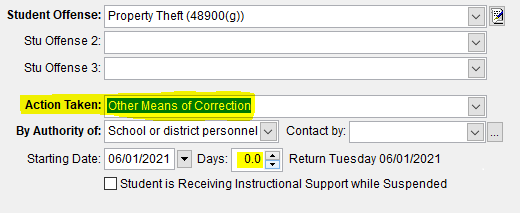(2) **All Incidents resulting in the use of behavioral restraints and seclusion even if they were not a result of a violation of Education Code Sections 48900 and 48915**
**Regarding 'Removal to Alt Setting' - Action**
If the student is in a Special Education Program (Student with an IEP) you may have to create a **Removal to Alt Setting action** for the same date as the suspension. The action needs to be added for each suspension. The date on the action must match the suspension date. You can enter this on the **Student Form – ACTIONS** page.
The Removal to Interim Alt Setting decision is determined by an IEP Team. In general, Unless told otherwise by an administrator, choose No Removal.
By adding this Action you can fix the following error:
CERT159 Error - Removal to Interim Alt Setting Populated for Non-Special Education Student
https://documentation.calpads.org/Troubleshooting/EOY3/CERT159/
More information can be found on this here:
https://documentation.calpads.org/OnlineMaintenance/IncidentData/IncidentDataPage/
**REMEMBER**: If you have no students marked with suspendable or expellable incident records you will have no records in the discipline export. Suspensions have to be recorded in the Discipline Tab of the student form and on the attendance day of the suspension as seen below:

EOY 1 - Course completion and Career Technical Education
Course completion data is only required for grades 9-12, and is optional for grades 7-8
The Following Files need to be Exported for 'End of Year 1':
- **SDEM Staff Demographics**
- **CRSC Course Section Completion** *(These will not go out unless your courses have valid codes.)*
- **SCSC Student Course Section Completion** *(If this shows all errors make sure the previous file posted!)*
- **SCTE Student Technical Education**
***REMEMBER****: If you do not record student marks in SchoolWise, you will have no records in the student course section completion export and/or not even be able to run the exports. Be sure to DOUBLE CHECK all data for ACCURACY – make sure your numbers make sense BEFORE submitting your files! It can save you time and potential loss of funding.*
Frequently Asked Questions

**Q. I sent up files already – NOW WHAT?**
A. If you’ve already begun to send up files for EOY don’t worry. Just send up the the E155 again to clear up any errors that you might have. However, if you started to send up files before your last day of school – you should start over to ensure accurate data is sent.
**Q. Direct Cert Code Changes what do I need to know?**
A. All of the codes are up to date in SchoolWise and ready to go, nothing to worry about here!
**Q. Absence Exempt Indicator**
A. Any student that is enrolled in Home Hospital is automatically sent up to CALPADS with this indicator checked to Yes. If a student enrolled after Feb 28th 2020 it automatically sends up this indicator. If you are having trouble and need to report a student manually, please set the indicator in CALPADS to Yes, then leave all of the fields for numbers blank.
Q. What about E155?
A. The E155 extract has to be completed PRIOR to EOY certification. It can only be submitted AFTER the rollover is complete! Please call SchoolWise to complete rollover as soon as you can.
## **Common CALPADS EOY Errors**
**CERT128 - Missing Absence Summary Data for Student.**
1. Check to make sure the SSID number match for this student in SchoolWise and CALPADS.
2. Check to make sure the student has an enrollment in a 0H class is SchoolWise.
3. If the student is Pre-School or Pre-TK CALPADS is working on a fix for this.
Helpful Website Links for EOY
[https://csis.fcmat.org/resources-repository#CALPADSResources](https://csis.fcmat.org/resources-repository#CALPADSResources)
##
THE DATA THAT YOU SUBMIT MATTERS
It is **VERY IMPORTANT** to Always check your numbers and read your CERTIFICATION snapshot reports carefully! It’s easy to get caught up in the looming DEADLINE for CALPADS and just click the button… but EOY includes data required for federal funding that doesn’t go up with any other submission. **Double & Triple check your TK, Homeless, Title 1, 504 and Armed Forces** **counts along with all of your other data**. Have more than one person look at the CERTIFICATION reports and numbers to makes that what you are sending up to CALPADS is correct. It is CRITICAL to have your numbers CORRECT! Meeting the Deadline is important but making sure that you are reporting accurately to CALPADS is paramount!

All of the data that you submit during the year is summarized in the CA School Dashboard. You should be aware of your dashboard status and be working to keep your LEA out of the RED ZONE.